This is a dialog window

What Is a Clone MOD APK? Why Some MOD Apps Install Beside the Original

May 29, 2026
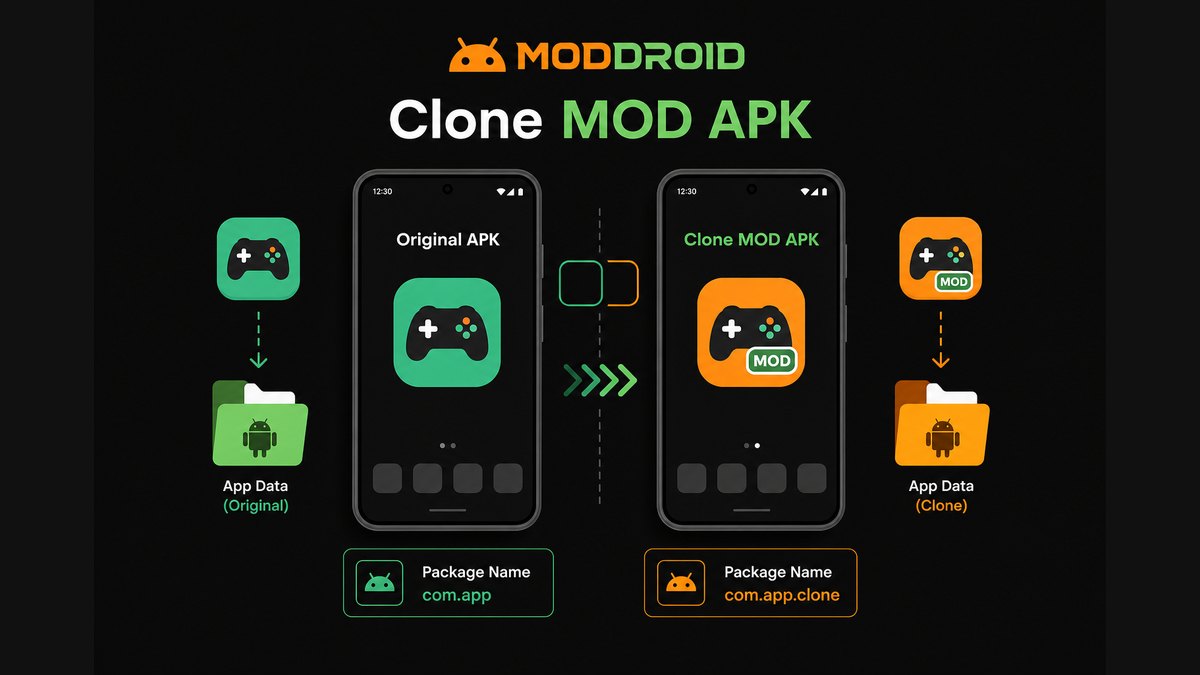
Clone MOD APK installed beside original APK with separate package names and app data folders

Browse MOD APK versions, clone builds, and update notes in the MODDROID app.

Download MODDROID App

Direct APK · Version details · Update-friendly Android MOD browsing

A clone MOD APK is a modified Android app that usually installs as a separate app beside the original. It often uses a different package name, a different signing identity, or a modified app label so Android treats it as another app instead of an update to the official one.

That sounds simple, but it explains many confusing MOD APK problems: duplicate app icons, separate app data, failed Google login, cloud sync not working, updates that install as a second app, and "App Not Installed" errors when users try to replace one package with another.

Quick answer: clone MOD APK in plain English

  • A clone MOD APK is usually a modified copy of an app with a different package name.
  • It can often install beside the original app instead of replacing it.
  • It normally has separate app data, settings, notifications, and update behavior.
  • It may not share login sessions, cloud saves, purchases, or backups with the original app.
  • It is useful for testing a MOD without touching your main install.
  • It is not automatically safer or more dangerous. Clone is a packaging method, not a safety rating.

Clone MOD APK vs Original Package MOD APK

The easiest way to understand clone MODs is to compare two package styles.

Original package MOD APK

This type tries to use the same package name as the official app, such as com.example.app. Android treats it as the same app identity. If the signature is compatible, it may update or replace the existing app. If the signature is different, Android may block the install.

Clone MOD APK

This type uses a different package name, such as com.example.app.clone or another renamed identifier. Android treats it as a separate app. It can often sit beside the official version with its own icon, storage folder, settings, and login state.

Simple rule: same package name means Android sees it as the same app; different package name means Android sees it as a different app.

Why Some MOD APKs Use Clone Packages

Clone packages exist because Android app identity is strict. Package name and signing certificate affect whether one APK can replace another. If a MOD build cannot match the official app signature, trying to install it over the original can fail.

A clone package can solve or avoid several practical problems:

  • Keep the original app installed. Users can test the MOD without deleting the official version.
  • Avoid signature conflict. A different package name can install separately instead of trying to replace an app signed by another certificate.
  • Run two versions at once. Some users want the official app for their main account and the MOD build for testing.
  • Protect main app data. Clone app data is usually separate, so testing a MOD may not touch the official app's local files.
  • Compare versions. Users can keep an older official app and a modified build side by side.

The trade-off is that separate package identity can also break features that expect the official app package name.

What Changes Inside a Clone MOD APK?

A clone build can change more than the visible app icon. Some changes are obvious, while others only matter when login, backup, updates, or deep links fail.

Package name

The package name is Android's main app identifier. If it changes, Android creates a separate installation and a separate app data space.

Signing certificate

Android uses signing certificates to decide whether an APK can update an existing app. A clone MOD may use a different signing identity from the official app, which is one reason it cannot update the original package.

App data directory

A different package name usually means a different data folder. Your official app's settings, downloads, game progress, or local files may not appear in the clone.

Deep links and login callbacks

Google login, Facebook login, payment callbacks, browser redirects, and share targets can depend on the package name or signature. When those values change, the clone may not be accepted by the same service.

Notifications and background services

Android may create separate notification channels, background tasks, and battery rules for the clone. This is why a clone may notify differently from the original app.

Common Problems with Clone MOD APKs

Clone builds solve one set of problems but can create another. These are the issues users usually notice first.

  • Two app icons appear. This is normal if the clone has a different package name.
  • Data is not shared. Official app data and clone app data are usually separate.
  • Google login fails. Google services may reject a different package name or signing certificate.
  • Cloud sync does not work. Backup and sync systems often expect the official app identity.
  • Game progress is missing. The clone may not read the same local data or account sync state.
  • Updates install as another app. A package mismatch means Android does not treat it as an update.
  • Notifications behave differently. The clone has its own notification channel and permissions.

If Android refuses to install an APK at all, use the App Not Installed troubleshooting guide before trying random copies from unrelated sources.

Why Login, Sync, and Purchases Often Break in Clone APKs

Many users expect a clone MOD to behave exactly like the official app, but account systems do not always work that way. Google, Facebook, cloud backup, subscriptions, and in-app purchases may verify the package name, app signature, app certificate fingerprint, or redirect URI.

If the clone package does not match the expected identity, the service may refuse login, fail to sync, ignore purchases, or send the callback to the official app instead of the clone.

This is why clone MODs are often better for offline tools, casual testing, or separate accounts than for apps where your main value depends on Google login, cloud progress, subscriptions, or official account history.

Is a Clone MOD APK Safe?

A clone MOD APK is not automatically safe or unsafe. Clone only describes how the app is packaged and installed. It does not prove whether the file is clean, well-maintained, or suitable for your account.

Risk depends on the source, permissions, behavior, version maintenance, and whether users can report problems. A clone build with clear version notes and active feedback is easier to judge than a random file with no context.

For a broader risk checklist, read Is It Safe to Download MOD APKs?. For platform review and report handling, see how MODDROID reviews user-submitted MOD APKs.

When You Should Choose a Clone MOD

Choose a clone MOD when separation is useful. It is often the better choice if you want to test a MOD without touching the official app.

  • Use it when you want to keep the original app installed.
  • Use it when you want two app instances with different data.
  • Use it when you want to test a MOD before trusting it with your main account.
  • Use it when replacing the official app would trigger signature conflicts.
  • Use it when you want to compare original and MOD behavior side by side.

When You Should Avoid a Clone MOD

A clone MOD is not always the right build. Avoid it when the app depends heavily on official identity, account trust, or cloud services.

  • Avoid it for banking, payment, wallet, or private identity apps.
  • Avoid it if you rely on Google login, Play Games, Google Drive sync, or official cloud backup.
  • Avoid it if you need the MOD to update the original app directly.
  • Avoid it if your main account, purchases, or game progress cannot be risked.
  • Avoid it if the clone asks for permissions that do not match the app's purpose.

If the APK fails before install starts, the issue may be compatibility or file structure rather than clone packaging. The APK Parsing Error guide explains those cases in more detail.

Clone MOD APK vs Dual App Feature

Some Android phones have a built-in Dual App, App Twin, or Parallel Apps feature. That is not exactly the same as a clone MOD APK.

A phone's dual app feature usually duplicates the installed official app inside the system's app-cloning layer. A clone MOD APK is a separate APK file that may already have a changed package name or signing identity before installation.

Both can create two app instances, but they work differently. Dual App is a device feature; clone MOD APK is a package-level change inside the APK file.

FAQ: Clone MOD APKs

What is a clone MOD APK?

A clone MOD APK is a modified Android app that usually uses a different package name or signing identity from the official app. This lets it install as a separate app beside the original instead of replacing it.

Why does a clone MOD APK install as a second app?

Android treats apps with different package names as different apps. If the clone MOD uses a package name like com.app.clone instead of com.app, it appears as a separate installation with separate data.

Can I update a clone MOD APK over the original app?

Usually no. A clone MOD APK with a different package name installs beside the original. It does not update the original app because Android sees it as a different package.

Why does Google login fail in some clone APKs?

Google login, Play Services, cloud sync, and billing can depend on package names, app signatures, and callback settings. A cloned package may not match what Google or the original developer expects.

Is a clone MOD APK safer than a normal MOD APK?

Not automatically. Clone is a packaging method, not a safety rating. Risk depends on the source, permissions, behavior, version maintenance, and user reports.

Should I uninstall the original app before installing a clone MOD?

Usually you do not need to uninstall the original if the MOD is truly a clone package. Keep the original if you want to protect your main account or compare behavior before using the MOD build.

Explore more Android MOD APK guides on MODDROID

Browse More MODDROID Guides

🔥 Ищете ещё Mod APK? Просмотрите самые популярные загрузки 2026 года. Смотреть популярное →
56.5K Shares
twitter facebook tumblr reddit quora medium