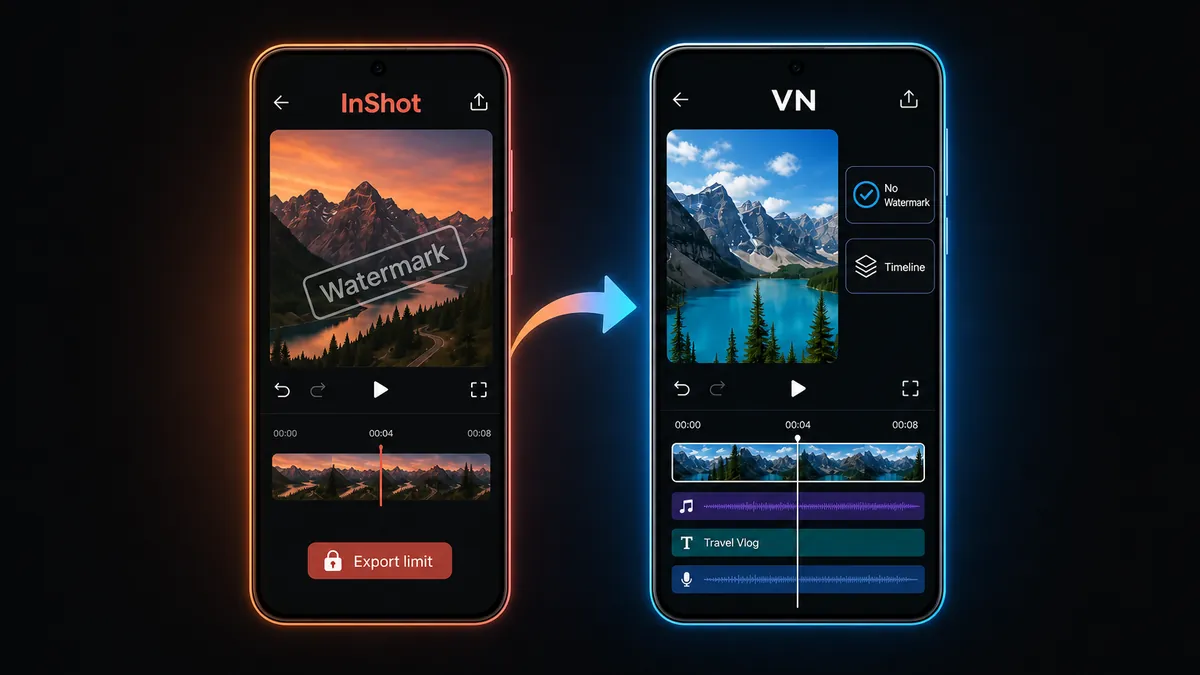
If InShot's watermark or subscription prompts are getting in the way, VN is the better free no-watermark editor to grow into.
Download VN Video Editor - Free, No Watermark
Video Players category · Free no-watermark exports · Timeline editing · Android video editor
InShot is popular for a reason. It is fast, friendly, and great for quick social videos. Many Android users can trim a clip, add music, choose 9:16, add stickers, and export without learning a heavy timeline editor.
The problem appears when the project starts to matter more. If a watermark shows up on export, a subscription prompt blocks a feature, or you want a cleaner long-term editing workflow, the question changes from "is InShot easy?" to "what is the best free InShot alternative without watermark?" For most users, the answer is VN Video Editor.
This guide is not about bypassing InShot's paid features. It is about choosing a free no-watermark editor when InShot's free workflow no longer fits your needs.
1
Why InShot Users Start Looking for an Alternative
▼
Most users do not leave InShot because it is hard to use. They leave when the free workflow starts to feel limited. The common friction points are simple: a watermark on export, subscription prompts around certain tools, template or sticker limits, and less room to grow once you want more timeline control.
That matters because watermark frustration usually appears at the worst moment: after the edit is done. You have already spent time cutting the video, choosing music, adding text, and preparing it for TikTok, Reels, Shorts, a school project, or a small business post. Then the final export does not look as clean as you expected.
This article is for that exact moment. InShot is still good for quick edits. But if watermark and subscription friction are now the problem, it makes more sense to move to a free no-watermark editor than to keep fighting the same export wall.
2
The Answer: Use VN as the Free No-Watermark Upgrade
▼
VN is the better next app because it solves the main InShot frustration without making you jump into a confusing professional tool. It gives Android users clean no-watermark exports, a stronger timeline, layered editing, text, music, transitions, speed tools, filters, and a workflow that can handle more than one quick clip.
The important difference is not just a feature list. VN feels like an editor you can grow into. You can start with the same simple tasks you already know from InShot: import, trim, add music, add text, choose a vertical ratio, export. Then, when you need more precision, VN gives you more control over timing, layers, pacing, and project structure.
Best fit: users who like InShot's quick-edit idea, but want free no-watermark exports and a more serious Android timeline editor for long-term use.
3
What VN Does Better for Daily Android Editing
▼
Clean exports without the watermark worry
The biggest reason to switch is simple: VN is a better fit when your priority is a clean video file. For creators posting to social platforms, sending client previews, saving family videos, or uploading to YouTube Shorts, a visible editor watermark can make the final result feel unfinished.
A timeline that grows with your skill
InShot is strongest when the edit is short and linear. VN is stronger when you start caring about timing, pacing, multiple clips, overlays, text placement, and audio changes across the whole project. It still works on a phone, but it teaches you a more flexible editing habit.
Less pressure to follow templates
CapCut is great when templates and trends are the point. VN is better when you want to build the edit yourself. For users leaving InShot because they want cleaner exports, VN keeps the focus on manual editing instead of pushing everything toward social templates.
Better long-term value
If you only edit one clip every few weeks, InShot may still be enough. But if video editing is becoming a regular habit, VN gives you more room to improve without making watermark removal the center of every decision.
4
What You May Miss From InShot
▼
The honest tradeoff is that InShot can feel faster for very simple social posts. If your whole workflow is trimming one clip, adding a sticker, changing the canvas ratio, and exporting immediately, InShot's single-purpose design is comfortable.
VN asks you to think a little more like an editor. That is a benefit when you want to improve, but it may feel like extra structure if all you need is a 20-second status video. Some sticker-heavy or one-tap social layouts may also feel quicker in InShot.
So the switch is not about saying InShot is bad. It is about choosing the right app for the moment: InShot for quick social edits, VN when no-watermark export and timeline control matter more.
5
When Another App Might Still Make Sense
▼
Use InShot if you only make quick vertical clips and you like its simple social-post workflow. If watermark removal is not a problem for your use case, InShot can still be the fastest option.
Use YouCut if you are completely new to editing and want the calmest first app. It is still our simplest beginner recommendation, especially for users who only need trim, music, text, ratios, and export.
Use CapCut if templates, auto-caption style workflows, and trend effects are the main reason you are editing. For manual no-watermark editing, VN is the better default.
Quick Decision Table
| Your situation |
Best choice |
Why |
| InShot watermark blocks your final export |
VN |
Free no-watermark exports with stronger timeline control |
| You want a long-term Android editor |
VN |
Better for layered projects, pacing, text, music, and manual editing |
| You only make very quick social clips |
InShot |
Fast single-purpose workflow for trim, ratio, stickers, and quick posts |
| You are editing for the first time |
YouCut |
Simplest beginner path before moving to VN |
| You mainly want templates or trend effects |
CapCut |
Stronger when social templates matter more than manual control |
Verdict: If InShot's Watermark Is the Problem, Download VN
InShot is still a good quick editor. It makes short social edits easy, and many users will continue to like its simple workflow. But if you are searching because of the InShot watermark, subscription prompts, or export limits, you are already looking for a cleaner long-term option.
That is why VN Video Editor is the better recommendation. It gives Android users free no-watermark exports, a stronger timeline, and enough editing control to grow beyond quick trims without turning every project into a template-first workflow.
FAQ: InShot Watermark and VN Alternative
Can I remove the InShot watermark for free?
Depending on the InShot version and export path, watermark removal may involve ads, a paid/subscription option, or an unlocked build. If your goal is a cleaner free no-watermark workflow, VN is usually the easier long-term alternative.
Is VN Video Editor free without watermark?
Yes. VN Video Editor is a strong free Android editor for clean no-watermark exports, which is why it is a natural recommendation for users leaving InShot because of watermark friction.
Is InShot still good for Android video editing?
Yes. InShot is still good for quick social edits, stickers, aspect ratios, and fast exports. VN is better when watermark-free export, timeline control, and longer-term editing matter more.
Is VN better than InShot?
VN is better for no-watermark exports, timeline control, layered editing, and longer-term skill growth. InShot is still faster for very simple social clips, stickers, and quick ratio changes.
Is VN better than CapCut?
VN is better if you want manual editing and clean exports without focusing on templates. CapCut is better when templates, trend effects, or auto-caption style workflows are the main goal.
Which free Android editor should I use after InShot?
Use VN if you are leaving InShot because of watermark, subscription, or export limits. Use YouCut if you want the easiest beginner app, and use CapCut if templates matter more than manual editing.
Related on MODDROID
Ready to leave watermark friction behind? Download VN Video Editor for clean Android exports.
Get VN Video Editor on MODDROID